

Quick answer: how to add a manager to Google Business Profile
To add a manager to Google Business Profile, search for your business name on Google while signed in, click the three-dot menu, choose Business Profile settings, open People and access, click Add, enter their email address, select Manager, then press Invite. The whole process takes about two minutes, and this guide shows every click.
Google retired the separate Google My Business dashboard, so everything now happens directly in Google Search or Google Maps. That catches a lot of people out, and it is exactly where our video picks up.
Before you add a manager to Google Business Profile
Make sure you are signed in to the Google account that manages your profile, because the settings only appear for that account. Then search your business name on Google. If you see a panel saying “Your business on Google”, you are in the right place. You also need the email address of the person or agency you are adding, and it must be a Google account.
Add a manager to Google Business Profile in six steps
The six steps below match the video exactly.
Step 1: Find your profile on Google
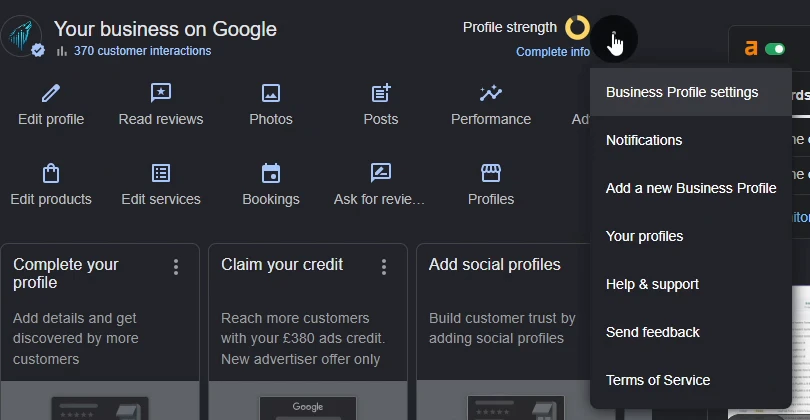
Search for your exact business name on google.com while signed in. The “Your business on Google” management panel appears at the top of the results, with shortcuts such as Edit profile and Read reviews.
Step 2: Open the three-dot menu
Click the three-dot menu next to the Profile strength dial, on the right of the management panel. A dropdown appears.
Step 3: Click Business Profile settings
From that dropdown, choose Business Profile settings, the first item on the list.
Step 4: Click People and access
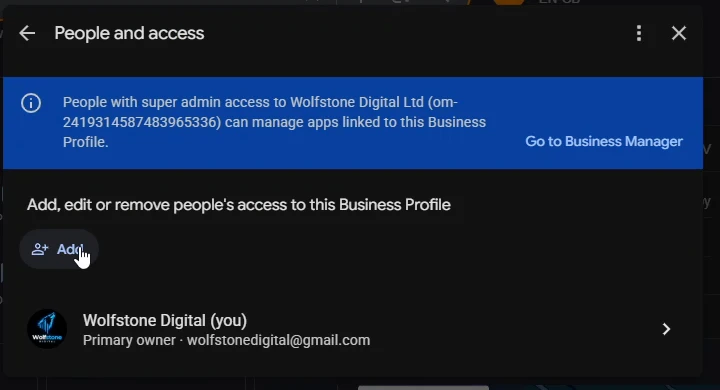
On the settings screen, click People and access. You will see everyone who currently manages the profile, including the primary owner.
Step 5: Click Add and enter the email address
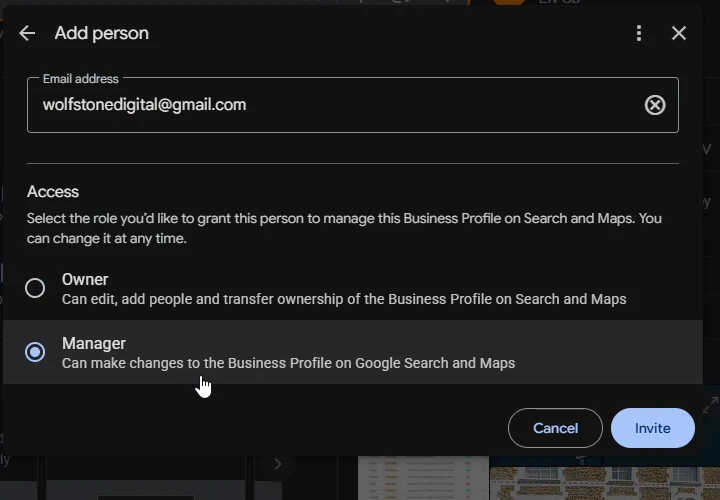
Click the Add button, then type the email address of the person you are adding. If you are working with us, that address is wolfstonedigital@gmail.com.
Step 6: Select Manager, then click Invite
Under Access, select Manager rather than Owner, then press Invite. The person receives an email invitation, and they join the profile as soon as they accept it.
Manager or Owner: which should you choose?
| Role | What it can do | Give it to |
|---|---|---|
| Primary owner | Everything, including deleting the profile | You, always |
| Owner | Everything except removing the primary owner | A business partner, if anyone |
| Manager | Edit the profile, post updates, reply to reviews, see insights | Your agency and your team |
Manager covers everything an agency needs, including editing your information, publishing posts, responding to reviews and tracking performance. Consequently, there is no good reason to hand an agency ownership, and a reputable one will not ask for it. Ownership is the control of the asset itself, and that should stay inside your business.
Frequently asked questions
Should my agency be an owner or a manager?
A manager, always. Managers can do the day-to-day work, while owners control the profile itself. If an agency insists on ownership, treat it as a red flag.
Can I add a manager to Google Business Profile from my phone?
Yes. Open the Google Maps app, tap your profile picture, then choose your business. The same People and access settings sit inside the menu.
Why can I not see Business Profile settings on Google?
Almost always because you are signed in to the wrong Google account. Switch to the account that verified the business, then search your business name again.
How do I remove a manager later?
Return to People and access, click the person’s name, then choose Remove person. The change takes effect immediately.
Do new managers have full control straight away?
Mostly, yes. Google applies a short probation to brand-new managers, so a few sensitive actions, such as deleting the profile or managing other users, can stay locked for the first days. Routine work like posts and review replies is available from the start.
Working with Wolfstone?
Invite wolfstonedigital@gmail.com as a Manager and we will pick it up the same day. Stuck on any step? Call us on 01284 598125 or email hello@wolfstone.digital.
Your Business Profile is usually the single biggest lever in local SEO, and the place we see movement fastest. Where it fits in a wider campaign is covered on our SEO services page.
Next in this series: how to give access to Google Analytics (GA4) and how to give access to Google Search Console.